Introducing the CloudThinker CostOps Agent: From Cost Anomaly to Landed Fix, on a Daily Loop
Today, we are announcing the CloudThinker CostOps Agent — a daily-running, agentic cost optimization specialist inside CloudKeeper that watches your AWS and GCP accounts, detects spend anomalies, isolates the cost driver, traces the root cause, opens the fix as a Merge Request inside your team's normal review queue, and learns from every approved change. The CostOps Agent runs on the same platform primitives as the rest of the CloudThinker Multi-Agent System — Connections, Auto Mode, and the Skills Library — so the loop runs end-to-end without a separate tool, a separate console, or a separate on-call.
Cloud cost tooling has spent the last decade getting better at showing you the bill. CloudKeeper does the next step: it gives the bill an owner who works around the clock, follows up on findings, and ships the change.
In this post, we walk through the five-phase CostOps loop the agent runs every day, the daily dashboard it produces for AWS and GCP, an end-to-end walkthrough on a representative AWS Bedrock + EC2 footprint, a side-by-side comparison against the existing solution landscape (AWS Cost Explorer, Compute Optimizer, Trusted Advisor, CloudHealth, Datadog Cloud Cost Management, Apptio Cloudability, Vantage, and Kubecost), and how to enable the CostOps Agent on your account in under thirty minutes.
By the end you will know:
- Why dashboards and recommendation engines stall at flagged and never reach fixed
- The five phases of the CostOps loop: Abnormal → Cost Driver → Root Cause → Resolve with approval → Learn
- How the CostOps Agent covers both AWS (CUR, Cost Explorer, Compute Optimizer, Trusted Advisor, EC2, EKS, RDS, S3, Bedrock) and GCP (BigQuery billing export, Recommender, GKE, Cloud SQL, Cloud Storage, Vertex AI)
- How Auto Mode lets you start in Notify, graduate to Act with approval, and finally to Autonomous as trust accumulates
- A direct comparison against the eight tools most teams have already deployed
The challenge: most FinOps stacks stall at "flagged"
Almost every cloud-cost program in 2026 looks the same in cross-section. There is a billing export, a dashboard, a weekly review meeting, and a Confluence page of recommendations that nobody has time to action. The work of cloud cost optimization is structurally split across three roles, and the handoffs between them are where dollars sit and rot:
- The finance team owns the number. They get a monthly invoice, a chargeback report, and a forecast. They are not in a position to delete an idle EC2 instance.
- The platform team owns the guardrails. They can deploy a tagging policy, an SCP, a budget alert. They cannot, in practice, audit 800 workloads a quarter for right-sizing.
- The workload owner owns the resource. They can resize the cluster, change the instance type, move to a Savings Plan. They are also the one shipping the next feature, on a deadline.
Native and third-party cost tools sit on top of this split and emit findings into it. AWS Trusted Advisor flags idle resources. AWS Compute Optimizer recommends right-sizing. CloudHealth, Apptio Cloudability, Vantage, and Datadog Cloud Cost Management aggregate, slice, and dice. Kubecost itemizes container spend. None of them know who owns the workload. None of them open the pull request. None of them follow up the next day to ask why the change has not landed.
The result is the pattern every FinOps lead in the region recognizes: a recommendation backlog that grows faster than it shrinks, a "potential savings" number on the homepage that never converts to a smaller invoice, and a quarterly review meeting where the same five findings keep appearing because the workload owner has been heads-down on a launch.
The CostOps Agent is built for that gap. It owns the loop from anomaly to landed Merge Request — and stays on it when the human attention does not.
Solution overview: the five-phase CostOps loop
The CostOps Agent does not produce a longer list of recommendations. It runs a closed loop, every day, on every connected AWS account and GCP project. The loop has five phases, each one a distinct unit of work that previously belonged to a different human.
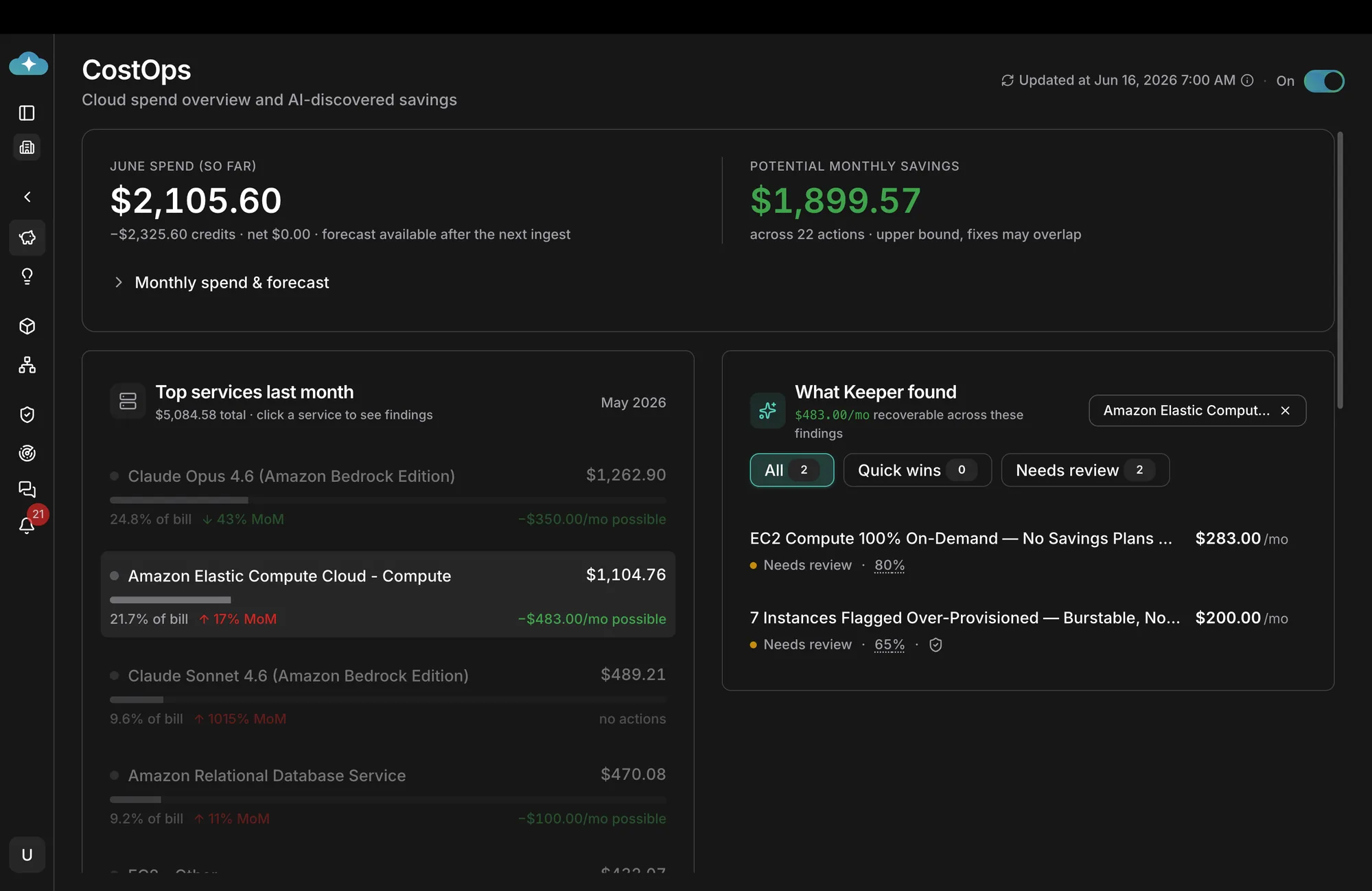
CloudKeeper CostOps dashboard — month-to-date spend, potential monthly savings, top services by month-over-month delta, and the open findings ready to action.
The screenshot above is the morning view from an active CostOps Agent run on a connected AWS account. The header tiles report month-to-date spend, the potential monthly savings the agent has already discovered, and the number of open findings ready to action. The body breaks down top services by month-over-month delta, and the right panel surfaces every open finding by service. Nothing on this page was assembled by hand. The five phases that produced it are:
Phase 1 — Abnormal: detect the anomaly within the day, not the month
Native tools detect anomalies on the invoice. The CostOps Agent reads the AWS Cost and Usage Report (CUR) and the GCP BigQuery billing export hourly, builds a per-service, per-region, per-tag baseline, and flags deviations within the same business day. In the dashboard above, Amazon Elastic Compute Cloud is up 17% month-over-month — the agent caught the inflection on the third day of the month, not at month close. Amazon RDS is up 11% MoM. Both were flagged as anomalies before the spend had compounded.
The agent watches more than the dollar value. It tracks unit economics — cost per request, cost per active user, cost per inference for Bedrock and Vertex AI — and flags drift on the ratio even when the raw spend looks flat. A 1015% jump in Claude Sonnet 4.6 usage on Bedrock with a steady end-user count is a different finding than a 1015% jump that tracks a new product launch. The agent labels the two differently.
Phase 2 — Cost driver: isolate what is pulling the bill up
A flagged anomaly is the start, not the answer. The agent then walks the dependency graph: which workload, which team, which feature flag, which deployment, which SKU. In the screenshot above, the EC2 anomaly is decomposed into the two findings on the right: a coverage gap (the workload is 100% On-Demand with no Savings Plans coverage, leaking $283/mo) and a sizing gap (7 instances over-provisioned against their observed CPU and memory, leaking $200/mo). The agent ranks drivers by recoverable dollars, not by raw cost. The cheapest service can still be the biggest driver of avoidable spend.
Phase 3 — Root cause: trace why, not just what
The "what" is the SKU. The "why" is the change that made it expensive. The agent cross-references the cost spike against deployment events from your CI/CD provider, infrastructure-as-code changes from your Terraform or Pulumi state, recent IAM policy changes, and traffic patterns from your APM. For the over-provisioned EC2 finding, the agent ties the spike to the workload's Auto Scaling group, the launch template version that bumped the instance class, and the Terraform PR that introduced it. The output is a Deep Dive report — a phased, evidence-backed explanation that names the commit, the engineer, the workload, and the corrective action.
Phase 4 — Resolve: agent ships the change, with the approval gate you choose
Every finding ends in a Merge Request, opened in the team's normal review queue. The MR includes the code or configuration diff, the Deep Dive that produced it, the live-state verification the agent ran before opening the MR, and the rollback path. Whether the MR auto-merges, requires a click, or goes through full code review is set in Auto Mode:
- Notify. The agent opens the MR and notifies the team. A human reviews and merges.
- Act with approval. The agent opens the MR and requests a one-click approval. On approval, the agent merges and applies.
- Autonomous. The agent merges and applies inside a pre-approved Runbook, with the audit trail attached.
A team typically starts in Notify on its first finding, graduates to Act-with-approval on Savings Plans coverage and storage tiering once the pattern is established, and only graduates to Autonomous on the highest-confidence Runbooks (idle resource cleanup, dev-environment shutdown, snapshot expiration). This is the same trust-progression model the rest of the platform uses for incident response and code review.
Phase 5 — Learn: the next similar finding arrives with the fix attached
Every approved Merge Request feeds the platform's memory. When the next workload develops the same 100%-On-Demand pattern, the agent does not file a fresh "needs review" finding — it arrives with the prior fix already proposed, linked to the original case, with the diff scoped to the new workload's parameters. The institutional knowledge that previously lived in two senior engineers' heads is now part of the agent's working memory. The hundredth Savings Plan is almost free.
How it covers AWS and GCP
The CostOps Agent reads from both cloud providers' native cost and observability surfaces, and acts through their native APIs. There is no agent installed inside a customer cluster, no sidecar to deploy, and no schema to maintain.
AWS coverage
- Cost surface. AWS Cost and Usage Report (CUR) hourly; Cost Explorer API for historical baselines; AWS Cost Anomaly Detection as a corroborating signal.
- Recommendation surface. AWS Compute Optimizer for EC2, Lambda, EBS, and Auto Scaling; AWS Trusted Advisor for idle resources and Reserved coverage; Bedrock model invocation logs for inference cost attribution.
- Runtime surface. EC2 right-sizing, Auto Scaling group resizing, EBS volume modification, S3 lifecycle policies, RDS instance class downgrades, EKS node pool re-shaping, Savings Plans purchase recommendations, Reserved Instance recommendations, Lambda right-sizing, Bedrock model selection (Opus → Sonnet → Haiku where the prompt allows it).
GCP coverage
- Cost surface. BigQuery billing export with detailed usage cost; Cloud Billing API for the live monthly figure.
- Recommendation surface. Google Cloud Recommender for VM right-sizing, idle VM cleanup, committed-use discount, and GKE optimization.
- Runtime surface. Compute Engine right-sizing, GKE node pool optimization (including Autopilot conversion candidates), Cloud SQL instance class adjustment, Cloud Storage lifecycle and storage class migration, BigQuery slot reservation right-sizing, Vertex AI model selection.
Both surfaces converge into a single view of spend, with one ranked list of findings, one daily report, and one set of Merge Requests. The team does not have to pick a "primary" cloud.
A daily walkthrough
- Phase 1Abnormal
Anomaly within the day, not the month
- Phase 2Cost Driver
Workload, team, SKU pulling the bill up
- Phase 3Root Cause
The commit and the change that made it expensive
- Phase 4Resolve
Merge Request with the approval gate you choose
- Phase 5Learn
Next similar finding arrives with the fix attached
The following walkthrough is taken from a representative production environment running a Bedrock-heavy AI workload on AWS. Timestamps are minutes elapsed from the daily 07:00 ingest, the same one shown in the dashboard screenshot above.
- T+00:00 — The daily ingest runs. The CostOps Agent reads the previous day's CUR partition, the GCP billing export delta, the Compute Optimizer recommendation set, and the Auto Scaling and deployment events from the connected AWS accounts.
- T+00:02 — The agent rebuilds the per-service, per-tag baseline. Two anomalies are flagged: Amazon Elastic Compute Cloud is +17% MoM, Amazon RDS is +11% MoM.
- T+00:04 — The cost-driver decomposition runs. The EC2 anomaly splits into two findings: a Savings Plans coverage gap ($283/mo recoverable) and an over-provisioning gap on seven instances ($200/mo recoverable). The RDS anomaly resolves to a single right-sizing finding ($100/mo recoverable).
- T+00:06 — The agent runs the root-cause Deep Dive on each finding in parallel. The over-provisioning finding is traced to a Terraform PR merged eleven days ago that bumped the instance class from
m6i.largetom6i.2xlarge; the workload's observed P99 CPU is 38%. The Savings Plans gap is traced to the rolloff of a one-year compute SP that expired last month. - T+00:09 — The dashboard updates with the new state: $1,899.57 recoverable across 22 actions, of which 2 are new and 20 are still open from prior days. The owning team (identified by the Terraform module's CODEOWNERS) receives a Slack message with a one-paragraph summary, a link to the Deep Dive, and the pre-staged Merge Request.
- T+00:12 — On Auto Mode set to Act with approval, the team lead clicks approve. The agent merges the Terraform change, the Auto Scaling group rolls one instance at a time, the live-state verification runs after each, and the dashboard updates as the savings are realized.
- T+24:00 — The next morning, the agent's Learn phase records the approved fix. The next workload that develops the same 100%-On-Demand pattern will arrive with the Savings Plans diff already drafted.
The same loop runs the next day. And the next. The dashboard's "Updated at" timestamp is the most important number on the page.
How the CostOps Agent compares to the existing solution landscape
The cost-tooling market has three tiers. Most of what is deployed today sits in the first two — and both stop at the same place: a flag in a dashboard. The CostOps Agent is the third tier. It does not replace the first two; it composes with them, adds the deep analysis, ships the resolution, and learns from the outcome.
Tier 1 — Rule-based detect + flag
The legacy of cloud cost management. Static thresholds, scheduled scans, and a list of findings on a tab nobody opens. Comprehensive on coverage, useful as a source of signals, structurally incapable of acting.
| Tool | What it does | Where it stops |
|---|---|---|
| AWS Trusted Advisor | Threshold-based checks for idle resources and low Reserved coverage. | Flag only. No driver attribution. No MR. |
| AWS Compute Optimizer | ML-derived right-sizing recommendations for EC2, Lambda, EBS, Auto Scaling. | Recommend only. No root-cause attribution to a commit. No MR. |
| GCP Recommender | Right-sizing, idle VM, and committed-use discount recommendations. | Recommend only. AWS surface is out of scope. |
| CloudHealth (VMware) | Multi-cloud aggregation, chargeback, governance reports. | Report layer. No runtime action. No agent. |
| Apptio Cloudability | Multi-cloud cost analytics, commitment management. | Heavy reporting, light action. No code-and-config MR. |
| Vantage | Multi-cloud cost dashboards, per-service breakdowns, alerts. | Reporting and alerts. No agent that ships the change. |
| Kubecost | Per-namespace, per-pod Kubernetes cost attribution. | Strong attribution; no MR; no Bedrock or Vertex AI coverage. |
Tier 2 — AI anomaly detection + flag
The "we put AI on it" tier. A learned baseline replaces the static threshold, which catches more anomalies earlier — but the output is still a flag in a dashboard, and a human still has to do the investigation, the chase, and the change.
| Tool | What it does | Where it stops |
|---|---|---|
| AWS Cost Anomaly Detection | ML-derived baseline on CUR; per-service and per-tag anomaly alerts. | Alert only. No driver decomposition. No MR. |
| Datadog Cloud Cost Management | Cost correlated with observability metrics; AI-derived anomalies on top of the same per-team views. | Surfaces in the dashboard. Does not file the fix. |
Tier 3 — Agentic, on top of the existing capabilities
The CostOps Agent does not replace Tier 1 or Tier 2. It reads from them: Trusted Advisor's flags, Compute Optimizer's right-sizing math, GCP Recommender's CUDs, Cost Anomaly Detection's per-tag spikes, Datadog's per-team correlations. Those become inputs. The agent then does the work the other tiers structurally cannot — deep analysis, resolution, and learning — and writes back into the team's normal Git, Slack, and ticketing queues.
| Layer | Tier 1 (rule-based) | Tier 2 (AI flag) | Tier 3 (CostOps Agent) |
|---|---|---|---|
| Detect | Static thresholds | Learned baseline | Composes both; cross-references deployments and IaC |
| Decompose driver | — | — | Workload, team, SKU, feature flag, deployment |
| Root cause | — | — | Names the commit, the engineer, the change |
| Open Merge Request | — | — | Code-and-config diff, live-state verified |
| Approval gate | — | — | Notify · Act with approval · Autonomous |
| Learn from outcome | — | — | Next similar finding arrives with the prior fix attached |
A team does not have to throw away what it already has. Trusted Advisor keeps flagging. Compute Optimizer keeps right-sizing. Cost Anomaly Detection keeps catching spikes. The CostOps Agent reads from all of them and is the only thing in the stack that closes the loop.
Getting started
The CostOps Agent ships with CloudKeeper. Wiring it onto a connected AWS account and GCP project takes three steps and roughly thirty minutes.
- Connect the accounts. Use CloudThinker Connections to attach the AWS account (read-only billing role, plus the write role you want the agent to use under Auto Mode) and the GCP project (BigQuery billing export reader, Recommender API, and the resource APIs you want the agent to touch).
- Set the Auto Mode level. Start in Notify. The agent files findings and pre-stages Merge Requests; humans approve and merge. Graduate one Runbook at a time to Act with approval, then to Autonomous as confidence accumulates.
- Watch the first daily report. Within twenty-four hours, the CostOps dashboard shows the first ranked findings, the per-workload spend view, and the recoverable-dollars number. The first Merge Request typically lands within the first week.
For teams already using CloudThinker for code review or incident response, the CostOps Agent shares the same Connections, the same Skills Library, and the same Auto Mode — there is nothing new to wire up at the platform layer.
Related reading
- CloudKeeper — Agentic Cloud Cost Optimization
- Auto Mode — Graduated Autonomy for AI Cloud Operations
- CloudThinker Connections — secure integration with AWS, GCP, GitLab, GitHub, and your stack
- Mastering Multi-Cloud CostOps: Why Multi-Cloud CostOps Matters
- CloudThinker × Global AWS FinOps: a use-case walkthrough
- Building a multi-account FinOps dashboard on AWS
Conclusion
The bill is the easy part. The hard part is closing the gap between a flagged finding and a smaller invoice — and that gap is structural, not technical. Three different humans own three different pieces of every cost decision, and the handoffs between them are where the dollars sit. The CostOps Agent owns the loop end-to-end: it sees the anomaly within the day, isolates the cost driver, traces the root cause, opens the Merge Request, and learns from every approved fix.
For teams already wired into AWS Cost Explorer, Trusted Advisor, Compute Optimizer, GCP Recommender, or any of the third-party FinOps stacks, the agent does not ask you to throw any of it away. It reads from what you have and writes the fix into the team's normal queue. The dashboard's most important number is no longer the bill. It is the timestamp on the last run.
Get started on the CloudKeeper page, or open a free CloudThinker account and connect your first AWS or GCP account today.