New CloudThinker Security Agent runs continuous agentic penetration testing from commit to deployment
A developer merges a branch at 10:40. The feature was written with an AI assistant in an afternoon. It adds one endpoint, GET /api/billing/{org_id}/export, and passes every check in the pipeline: unit tests, lint, SAST. Nobody notices that the handler never asks whether the caller belongs to org_id. The next pentest is in four months.
That's the gap we built the CloudThinker Security Agent for. It runs penetration tests continuously, on every commit in your CI/CD pipeline. Six domain specialists (code, web, infrastructure, database, identity and secrets) discover the attack surface, plan exploits, prove them safely, and route the ticket to the developer who wrote the code. A run takes under 15 minutes.
This post covers why the usual security layers can't keep pace with AI-assisted development, how the Security Agent is wired, one pentest walked end to end, the OWASP API Security Top 10 report it produces, and how to roll it out in GitLab CI or GitHub Actions over four weeks.
Why the traditional security stack falls behind
AI-assisted development (we'll call it the AI-Driven Development Lifecycle, or AI-DLC) has compressed release cycles by three to five times. Teams using Claude Code, Cursor and similar tools ship in hours what used to take days. The testing layer was designed for weekly or monthly releases, and each part of it misses for a structural reason.
Static analysis has no runtime context. Tools like SonarQube and Trivy read source files and dependency manifests. They report every CVE in the tree, including transitive packages no process ever loads. In one customer environment, an SCA scanner reported 847 critical CVEs. Reachability analysis later showed 3 were exploitable and 844 were dead code. The triage cost three engineer-weeks.
Legacy DAST stops at the login page. Crawlers and fuzzers were built for unauthenticated HTML. JWT, OAuth and MFA, which every modern SaaS uses, return 401 to the scanner, which marks the route "unauthenticated" and moves on. In customer engagements we've measured 90% of the authenticated API surface left untested.
Manual pentesting runs on a calendar. A typical enterprise contract costs $150,000 or more a year and delivers a report twice a year. The code can change 200 times between engagements. By the time the report lands, many findings point at code paths that no longer exist, and the new ones haven't been looked at.
01SAST and SCA
No runtime
Reads files on disk and reports every CVE in the tree, reachable or not.
02Legacy DAST
Stops at 401
Built for unauthenticated HTML. JWT, OAuth and MFA end the crawl early.
03Manual pentest
Twice a year
A good report on code that has changed 200 times since it was scoped.
04Agentic pentest
Every deploy
Authenticated, runtime-aware tests on each merge, each finding proved before it is filed.
None of these tools is bad at its job. The problem is cadence and context: a test that doesn't run on the change, or can't log in, or can't tell reachable from dead code, leaves verified vulnerabilities sitting in production between audits.
How the Security Agent is wired
The Security Agent is one of CloudThinker's domain specialists, alongside the Cloud Engineer, Kubernetes Engineer, Database Engineer and Principal Generalist. It runs on the same platform foundation:
- Pre-installed Skills. Vulnerability scanning, exploit chaining, safe proof-of-concept generation, OWASP mapping and report rendering ship from the CloudThinker Skills Library, ready on day one.
- Sandbox-isolated execution. Every skill runs in CloudThinker's Sandbox, with strict egress policies, ephemeral storage and a tamper-evident audit trail.
- Connections to your stack. CloudThinker Connections links GitLab, GitHub, AWS, Azure, GCP, Amazon EKS, your identity provider and your ticketing system, so the agent can read the diff, scope the test and file the Jira ticket without manual setup.
- Default or custom. Deploy with the default Skills and Rules of Engagement in minutes, then author your own skills with the Skills Framework as the environment grows.
01Trigger
CI/CD
 GitLab CIPost-deploy webhook on staging
 GitHub ActionsSame webhook, merge or deploy event
- ChatRun a saved skill on demand
HTTPS webhook, nothing installed
02Test
 CloudThinker
- Discover the surfaceOpenAPI schema, SPA bundle, auth flow
- Chain and proveRead-only PoC in the Sandbox
- ReportOWASP API Top 10 mapped, patch attached
Bound by Rules of Engagement
03Where the team works
Tickets and chat
- JiraTicket with AST reference
 SlackCritical findings to the author
 Microsoft TeamsSame alert, same evidence
Plus email and the CloudThinker Inbox
A typical web and API run has four moving parts:
- CI/CD trigger. A merge or post-deployment webhook from GitLab CI or GitHub Actions starts the run. You can also run a saved skill like
/pentesting-web-apifrom any workspace channel. - Security Agent.
@web-security(plus any other specialist scoped into the run) runs in CloudThinker's Sandbox with a full audit trail. - Target backend. The agent fetches the live OpenAPI or GraphQL schema, parses the client-side SPA bundle, and fuzzes the staging API under the configured Rules of Engagement. Production data is never read or modified.
- Alerts and tickets. Verified critical findings go out in parallel to Slack, Microsoft Teams, email, Jira and the CloudThinker Inbox, each with the AST reference of the offending code, a suggested patch and the proof-of-concept that confirmed it.
Everything runs over HTTPS webhooks. Nothing is installed in your cluster.
How it tests
The Security Agent reproduces the three loops a human tester runs in a manual engagement, then adds the routing step a human tester usually leaves to someone else.
01Discover
Map the surface
Parse the SPA bundle and schema, resolve auth from the Rules of Engagement.
02Plan
Chain findings
Combine small issues (a verbose error, a missing check) into one attack path.
03Prove
Safe PoC
Run a read-only exploit in staging. No proof, no alert.
04Route
To the author
Ticket, patch and PoC go to the developer who wrote the code.
- Surface discovery. Parse the SPA bundle, list the API routes the front end actually calls, and resolve authentication state (JWT, OAuth, session headers) from the Rules of Engagement. This is where legacy DAST stops; here it's step one.
- Planning and exploit chaining. A closed-loop ReAct reasoning pattern correlates independent low-severity findings (a verbose error, a CORS misconfiguration, a missing authorization check) into a multi-stage attack path.
- Safe active verification. The agent writes a read-only proof-of-concept (a non-mutating query, a loopback SSRF, a header echo) and runs it in staging. If it works, the finding is confirmed and filed. If it doesn't, no alert is raised.
That third step is where the low false-positive rate comes from. Every reported finding is backed by an exploit the platform actually ran against the live system, inside the boundaries your Rules of Engagement set.
The six specialists
CloudThinker doesn't ship one monolithic security agent. It ships six specialists, each scoped to part of the attack surface and each backed by a purpose-built Skill.
01@code-security
Static code
AST parsing, custom Semgrep rules and SCA reachability on FastAPI and Next.js repos.
02@web-security
Web and API
Session fuzzing, JWT and OAuth handling, IDOR and BOLA discovery on live routes.
03@infra-security
Cloud and Kubernetes
Namespaces, network policies, IRSA bindings and pod privilege boundaries on EKS.
04@database-security
Databases
Read-only injection checks and privilege-bypass tests on PostgreSQL and Redis.
05@identity-access
Identity
Token signing, session fixation and privilege escalation across OAuth and SAML.
06@secrets-guardian
Secrets and config
Hardcoded keys, stale certificates and config drift across environments.
All six inherit the same platform controls. The Guardrails Engine applies input and output policies to every model call, the Sandbox bounds the blast radius of every action, the Knowledge Base keeps prior findings across runs, and Auto Mode governs every change (more on that below). The full reference is at docs.cloudthinker.io.
You can talk to them from Slack or Microsoft Teams in plain language:
"@web-security run a white-box pentest on api.example.com, build the OWASP Top 10 report, and alert #alert on anything critical."
"@web-security show me the attack path for P0-1."
"@web-security open a merge request that fixes P0-1, and tag the author for review."
Three messages, one Jira ticket with a patch attached.
Walkthrough: one pentest, 15 minutes
This walkthrough comes from a representative customer environment. Timestamps are minutes after the push.
T+00:00, the change. A developer merges feature/billing-export into dev. The merge request adds GET /api/billing/{org_id}/export.
T+00:01, the trigger. A GitLab webhook fires. @web-security receives the diff, the staging URL and the Rules of Engagement for the target.
T+00:03, the readings. The agent parses the SPA bundle, finds the new route, and sees the client SDK pass org_id from the URL straight to the query layer. There are three ways to read that:
- The check lives elsewhere. A middleware or gateway policy enforces tenant scope before the handler runs. If so, a cross-tenant request returns
403or404. - The check is missing. The handler trusts the path parameter. A cross-tenant request returns another tenant's rows.
- The route isn't reachable. It's behind a feature flag in staging. Any request returns
404, and there's nothing to test yet.
T+00:05, the suspicion. A first finding: suspected Broken Object Level Authorization (OWASP API1:2023, often called IDOR) on org_id. It isn't ticketed yet, because nothing has been proved.
T+00:09, the chain. A second, separate finding: a malformed org_id triggers a verbose 500 that leaks the SQL query template. That rules out a gateway check (the request reached the query layer) and tells the agent exactly which column scopes the query.
T+00:12, the proof. The agent authenticates as a test user in tenant A and requests tenant B's export, using a sibling org_id that belongs to a different tenant in the staging namespace:
curl -s -o /dev/null -w "%{http_code}\n" \
  -H "Authorization: Bearer $TENANT_A_TOKEN" \
  https://api.staging.example.com/api/billing/$TENANT_B_ORG_ID/export
# expected if scoped: 403 or 404
# observed: 200, with tenant B's rows in the body
It's a read-only GET. Nothing is written, and the request stays inside the staging namespace the Rules of Engagement allow. The exploit is confirmed.
T+00:13, the ticket. A Jira ticket opens at P0 (Critical) with the AST reference of the missing check, the proof-of-concept script, the staging trace, the OWASP reference, and a four-line suggested patch. For a FastAPI handler it looks like this (illustrative):
@router.get("/api/billing/{org_id}/export")
async def export_billing(org_id: str, user: User = Depends(current_user)):
    if org_id not in user.org_ids:
        raise HTTPException(status_code=404)
    return await billing.export(org_id)
Returning 404 rather than 403 avoids confirming that another tenant's ID exists.
T+00:15, the gate. The merge into main is blocked, and the developer gets a Slack message with the patch staged for review.
Fifteen minutes from commit to a verified, ticketed, patch-attached finding. That's roughly the time it took the AI assistant to write the feature.
Sample output: the OWASP API Security Top 10 report
Every run produces a report mapped to the OWASP API Security Top 10 (2023), with severity, action priority and the proof-of-concept attached to each finding.
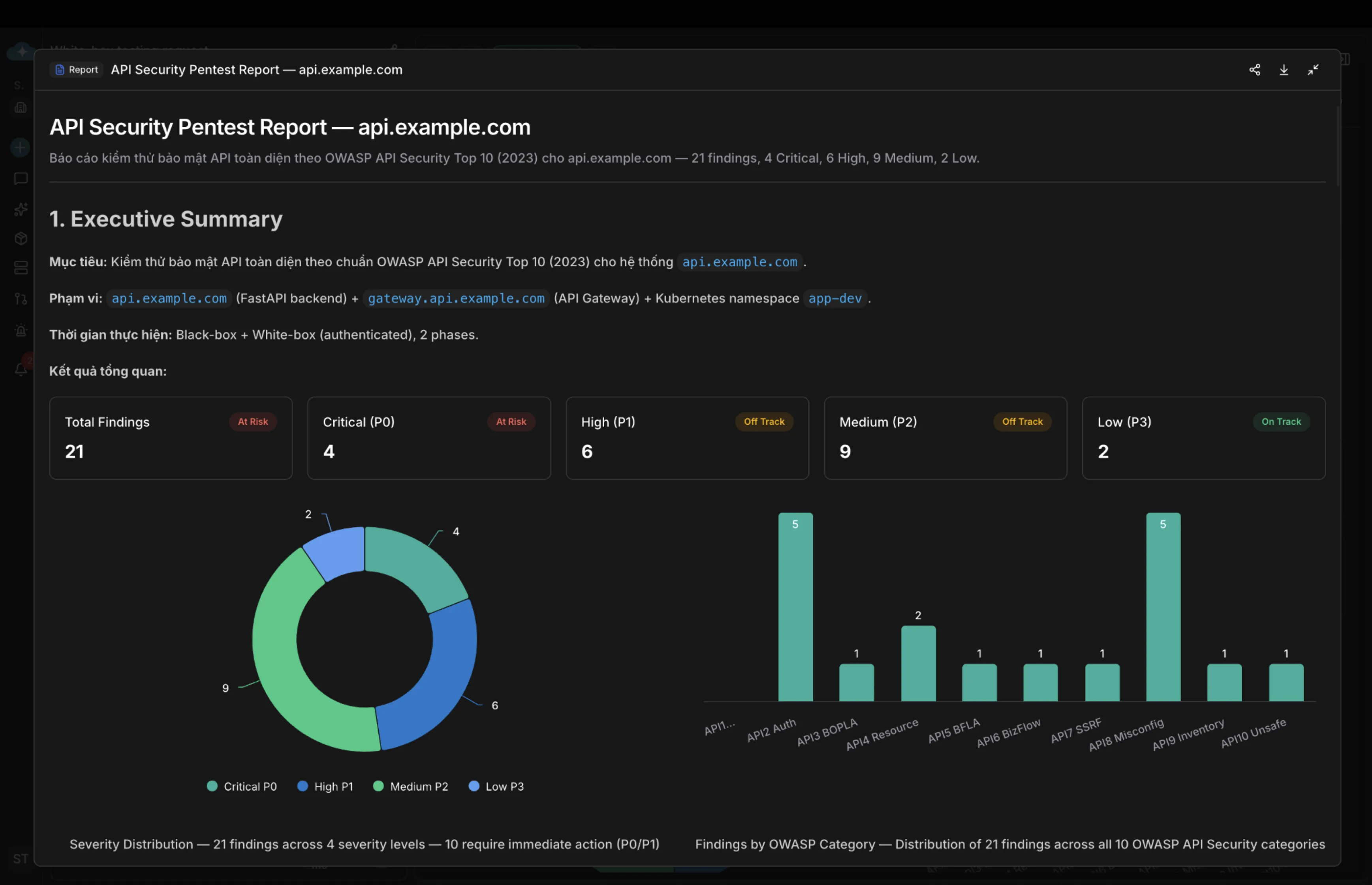
The report above is typical of a first run against an authenticated SaaS API. The black-box phase ran first against the public surface, then the white-box phase followed with test credentials from the Rules of Engagement. It separates the 10 findings that need immediate action (P0 and P1) from the ones that can wait for the next sprint.
Reports export as DOCX, PDF and Markdown, so you can hand them straight to compliance reviewers, customers and auditors. That includes the artifact pattern used during SOC 2 Type II audits.
Why this beats the traditional approach
| SAST + DAST + biannual pentest | CloudThinker Security Agent | |
|---|---|---|
| When it runs | On commit (SAST), on schedule (DAST), twice a year (manual) | On every merge or deploy, plus on demand from chat |
| Authenticated surface | Mostly untested past the 401 | Auth resolved from the Rules of Engagement |
| Reachability | Every CVE in the tree | Findings tested against the running system |
| Proof | Scanner signature or a tester's notes | A read-only PoC that actually ran |
| Who gets the finding | A security queue, weeks later | The developer who wrote the code, with a patch |
| Report | A PDF per engagement | OWASP-mapped report per run, exportable |
The deeper difference is where the judgment happens. A scanner applies the same signatures to every target and leaves the reasoning to a human. A pentester reasons well but only twice a year. The Security Agent does the reasoning (which reading of this route is true, which findings chain, what would prove it) on every change, and shows its work.
Customer outcomes
Against a legacy SAST, DAST and biannual-pentest baseline, customer engagements to date show:
| Outcome | Result |
|---|---|
| Security testing cost | 70% lower. Replaces $150K+ a year of manual engagements with continuous automation. |
| Commit to verified PoC | 15 minutes, mean time to a safely validated proof-of-concept alert |
| False positive rate | Near-zero. Every finding is confirmed by a read-only PoC in staging. |
The metric that matters most isn't in that table: how long a critical vulnerability lives in production. Customer measurements show it dropping from days (between scheduled audits) to under 24 hours from the original commit.
For comparable stories, see the CloudThinker case studies, including how Diaflow reached SOC 2, HIPAA and GDPR readiness across three regions in four weeks, and how F88 runs a regulated DevSecOps program across more than 800 branches.
What runs without asking
Active testing against your systems should raise questions about control. Writes like opening a merge request, blocking a merge or changing a skill go through Auto Mode, so you decide what runs on its own and what waits for approval. Every test, proposal, approval and change lands in the audit trail.
Phased rollout
We recommend four phases over about four weeks, so the security and platform teams can check each capability before turning on the next.
- Week 1: passive audit. Reconnaissance, certificate transparency log analysis, TLS validation and subdomain enumeration. The output is a full attack-surface map with no active traffic sent to production.
- Week 2: active web and API scan.
@web-securityand@database-securityare scoped to staging subnets only (for example,10.x.0.0/16). Findings start appearing, but no exploits run yet. - Week 3: safe exploit engine. Read-only proof-of-concept exploits are switched on. From now on, findings are confirmed by an automated PoC before they're reported.
- Week 4: CI/CD blocking. The agent is connected to GitLab or GitHub merge gates. Verified critical exploits block the merge, open a Jira ticket and page the on-call in Slack.
By the end of week 4, no critical exploit lands in main without an agent either testing it or recording that it couldn't. The full rollout playbook is at docs.cloudthinker.io.
Best practice: build a Security Skill for each domain
The default skills cover the common cases, but every environment has its own endpoints, auth flows and things you must never touch. The recommended path is to start in chat, save what works as a reusable Skill, and then automate it.
1. Start with a prompt
Don't write a skill from scratch. Describe what you want tested, how, and what the output should look like:
"Pentest the web API at api.example.com with a black-box and a white-box phase per the OWASP Top 10, and export the report with CVE mapping."
The agent runs this once in CloudThinker's Sandbox. It maps the attack surface (black-box), resolves the auth flow with the credentials in your Rules of Engagement (white-box), runs the OWASP Top 10 checks, proves each finding with a safe PoC, and exports the report with CVE mapping and AST references. Treat this first run as calibration: review the discovered surface, the credentials it used and the findings, then refine the prompt if anything is wrong for your environment.
2. Save the run as a skill
When a run produces a report you'd want again, ask for it to be saved:
"Save this run as a skill called pentesting-web-api. Scope it to api.example.com, log in with the bearer token flow we used, test the OWASP Top 10, and produce a CVE-mapped report."
The skill captures what's needed to repeat the test the same way every time:
- The endpoint patterns it discovered (for example,
/v1/billing/{org_id}/export) - The auth flow (login URL, token refresh interval, header injection rules)
- The Rules of Engagement (allowed HTTP methods, rate limits, destructive operations to avoid)
- Environment-specific logic (for example, "skip endpoints tagged
internal-only" or "only test API v2 and higher") - Secret bindings: workspace secrets for shared values, skill-scoped secrets for the test, per-run injection for short-lived tokens. All are encrypted at rest, redacted from prompts and kept out of logs.
- Notification routing (Slack channel, Jira project, severity thresholds)
Skills are versioned in the Knowledge Base and available to everyone with workspace access. The same pattern works for every specialist: pentesting-postgres for @database-security, pentesting-corp-sso for @identity-access, and so on.
3. Run it
From then on, a pentest is one call: /pentesting-web-api. Same Rules of Engagement, same surface, same auth flow, same report shape. No re-prompting, no rediscovering the API, no drift in method between runs.
4. Automate it
Two trigger patterns cover most needs:
- Webhook triggers. Run
/pentesting-web-apion every merge intomainor every staging deploy through GitLab CI, GitHub Actions or a post-deployment webhook. The pipeline blocks on verified critical findings and posts the report to Slack, Microsoft Teams or the CloudThinker Inbox. - Schedule triggers. Run nightly (for example, 02:00 UTC) for a continuous baseline of staging, with a diff against the previous run in your security channel each morning.
A GitLab CI job that calls the webhook after a staging deploy looks like this. The URL comes from your workspace's trigger settings, and the JSON body is an example; send whatever fields your trigger is configured to read.
pentest-staging:
  stage: post-deploy
  needs: ['deploy-staging']
  rules:
    - if: '$CI_COMMIT_BRANCH == "dev"'
  script:
    - >
      curl --fail -X POST "$CLOUDTHINKER_PENTEST_WEBHOOK"
      -H "Content-Type: application/json"
      -d "{\"commit\": \"$CI_COMMIT_SHA\", \"environment\": \"staging\"}"
Store CLOUDTHINKER_PENTEST_WEBHOOK as a masked CI/CD variable. The trigger reference is at docs.cloudthinker.io.
Keeping skills current
When the environment changes (a new endpoint, a different auth flow, a renamed parameter), the agent spots the drift on the next run and proposes an update to the skill as a diff in the Knowledge Base. Each diff goes through the same approval controls as any other change.
Getting started
Three steps to a first run:
- Connect the repository and the staging environment. CloudThinker Connections has first-party integrations for GitLab, GitHub, AWS, Azure, GCP, Amazon EKS and the major identity providers. Setup docs are at docs.cloudthinker.io.
- Define the scope. Set the Rules of Engagement: target hostnames, test credentials, staging subnets and the OWASP categories to cover. Out of the box, the agent maps to the OWASP API Security Top 10 (2023) and the OWASP Top 10 for Web.
- Wire the webhook. Add the post-deployment webhook to your GitLab CI or GitHub Actions pipeline. The agent then runs on every merge and posts findings to Slack, Microsoft Teams, Jira or the CloudThinker Inbox.
Then ask for a first, read-only run:
"Run a web and API pentest against api.staging.example.com for the OWASP API Top 10. Post critical findings to #sec-criticals. Propose fixes only, change nothing."
Related reading
- CloudThinker Security: defense in depth across infrastructure, application and agentic layers
- CloudThinker's security agent for cloud posture, the cloud-posture sibling of the testing agent
- Skills Framework: modular, composable agent capabilities
- Auto Mode: decide what runs on its own
- Diaflow case study: SOC 2, HIPAA and GDPR across three regions in four weeks
- CloudThinker documentation
Conclusion
Code now reaches production at the speed of the assistant that wrote it. The Security Agent moves testing to the same tempo: a test on every change, a proof behind every finding, and the fix in front of the developer who can apply it while the code is still fresh in their head.
Visit the CloudThinker Security page, read the documentation, or book a demo to see a run against your own staging API.
Steve Tran, CTO, CloudThinker